
Using a Adafruit 1.8" TFT Display Shield V2
What is theAdafruit 1.8" Color TFT LCDShield Display?V2?
A TFT LCD display is a type of screen that uses Thin-Film Transistor (TFT) technology to control the pixels of a Liquid Crystal Display (LCD). It is one of the most common display types found in devices like smartphones, tablets, monitors, car dashboards, industrial equipment, and many embedded electronics.
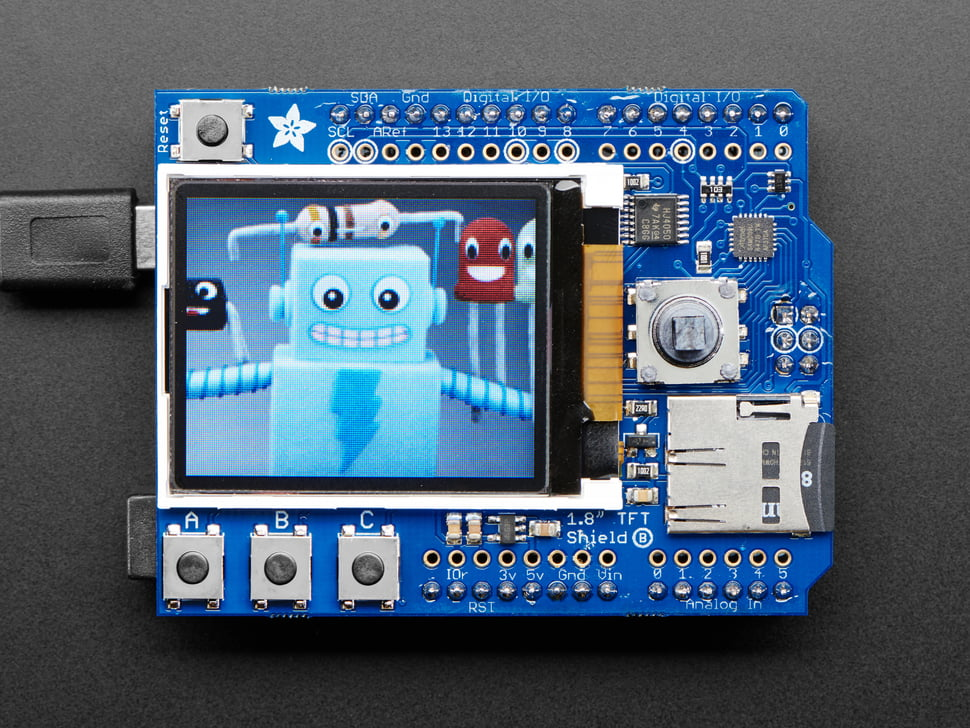
InSince thisit tutorial,is wea willshield beso usingno JOY-ITwiring SBC-LCD01is withneeded, SPIthe communication.
3.3Vjust Logic
sit Aon lottop of LCD displays have a logic level of 3.3V, including SBC-LCD01. If you use any classicthe Arduino (UNO and Leonardo) with 5V logic, the display may misbehave. 3.3V Arduino includes Due, Zero, Nano 33 and MKR series. In this tutorial, we will be using Nano 33 Sense Rev2.UNO.
Wiring
Wiring up the sensor is simple:
Find the correct Pins for SPI communication
Every Arduino model has their own unique pinout. Make sure you are using the correct pins for SPI clock and MOSI.
VCC to 3.3VGND to GNDSCL to SPI CLock Pin (Pin 13 on Nano 33 Sense)SDA to SPI MOSI Pin (Pin 11 on Nano 33 Sense)RST to Pin 4DC to Pin 5
Library
To use this code you will need the Adafruit ST7735 and ST7789 Library and Adafruit GFX Library
We have a tutorial on how to install a library here.
Getting started
This example code from the library seesaw_shield18_test will displaytest "Joy-IT" onall the screen.buttons and the joystick.
#include <SPI.h>
#include <SD.h>
#include <Adafruit_GFX.h>
#include <Adafruit_ST7789.Adafruit_ST7735.h>
// Be sure to install Adafruit seesaw library!
#include <Adafruit_seesaw.h>
#include <SPI.Adafruit_TFTShield18.h>

Adafruit_TFTShield18 ss;

#define CSSD_CS    4  // Chip select line for SD card on Shield
#define TFT_CS  10  // Chip select line for TFT display on Shield
#define TFT_DC   8  // Data/command line for TFT on Shield
#define TFT_RST  -1  // DeclarationReset ofline Chipfor SelectTFT #defineis DChandled 5by //seesaw!

DeclarationAdafruit_ST7735 of Data / Command Pin
#define RST 4 // Declaration of RESET Pin


Adafruit_ST7789 lcdtft = Adafruit_ST7789(CS,Adafruit_ST7735(TFT_CS, DC,TFT_DC, RST)TFT_RST);

void setup(void) {
  lcd.init(240, 240, SPI_MODE2)Serial.begin(9600);
  lcd.setRotation(1);while delay(500)(!Serial);

  // fillstart Displayby withdisabling both SD and TFT
  pinMode(TFT_CS, OUTPUT);
  digitalWrite(TFT_CS, HIGH);
  pinMode(SD_CS, OUTPUT);
  digitalWrite(SD_CS, HIGH);

  // Start seesaw helper chip
  if (!ss.begin()){
    Serial.println("seesaw could not be initialized!");
    while(1);
  }
  Serial.println("seesaw started");
  Serial.print("Version: "); Serial.println(ss.getVersion(), HEX);

  // Start set the backlight off
  ss.setBacklight(TFTSHIELD_BACKLIGHT_OFF);
  // Reset the TFT
  ss.tftReset();

  // Initialize 1.8" TFT
  tft.initR(INITR_BLACKTAB);   // initialize a colourST7735S andchip, ablack Stringtab

  lcd.fillScreen(0x22ED)Serial.println("TFT OK!");
  lcd.setCursor(20,tft.fillScreen(ST77XX_CYAN);

  Serial.print("Initializing SD card...");
  if (!SD.begin(SD_CS)) {
    Serial.println("failed!");
  } else {
    Serial.println("OK!");
    File root = SD.open("/");
    printDirectory(root, 0);
    root.close();
    bmpDraw("/parrot.bmp", 0, 0);
  }

  // Set backlight on fully
  // ss.setBacklight(TFTSHIELD_BACKLIGHT_ON);
  // Or you can set the backlight one third on
  // ss.setBacklight(TFTSHIELD_BACKLIGHT_ON / 3);
  // Or dim it up
  for (int32_t i=TFTSHIELD_BACKLIGHT_OFF; i<TFTSHIELD_BACKLIGHT_ON; i+=100) {
    ss.setBacklight(i);
    delay(1);
  }
  delay(100);
  lcd.tft.fillScreen(ST77XX_RED);
  delay(100);
  tft.fillScreen(ST77XX_GREEN);
  delay(100);
  tft.fillScreen(ST77XX_BLUE);
  delay(100);
  tft.fillScreen(ST77XX_BLACK);

  tft.setTextSize(1);
  tft.setTextColor(ST77XX_WHITE);
  lcd.setTextSize(6)tft.setCursor(0, 0);
  lcd.tft.print("Joy-IT"Press all the buttons");
}


uint8_t buttonhistory = 0;

void loop() {
  uint32_t buttons = ss.readButtons();
  tft.setTextSize(3);
  if(! (buttons & TFTSHIELD_BUTTON_DOWN)){
    tft.setTextColor(ST77XX_RED);
    tft.setCursor(0, 10);
    tft.print("Down ");
    buttonhistory |= 1;
  }
  if(! (buttons & TFTSHIELD_BUTTON_LEFT)){
    tft.setTextColor(ST77XX_YELLOW);
    tft.setCursor(0, 35);
     tft.print("Left ");
    buttonhistory |= 2;
  }
  if(! (buttons & TFTSHIELD_BUTTON_UP)){
    tft.setTextColor(ST77XX_GREEN);
    tft.setCursor(0, 60);
    tft.print("Up");
    buttonhistory |= 4;
  }
  if(! (buttons & TFTSHIELD_BUTTON_RIGHT)){
    tft.setTextColor(ST77XX_BLUE);
    tft.setCursor(0, 85);
    tft.print("Right");
    buttonhistory |= 8;
  }
  if(! (buttons & TFTSHIELD_BUTTON_1)){
    tft.setTextColor(ST77XX_BLUE);
    tft.setCursor(0, 140);
    tft.print("1");
    buttonhistory |= 16;
  }
  if(! (buttons & TFTSHIELD_BUTTON_2)){
    tft.setTextColor(ST77XX_GREEN);
    tft.setCursor(50, 140);
    tft.print("2");
    buttonhistory |= 32;
  }
  if(! (buttons & TFTSHIELD_BUTTON_3)){
    tft.setTextColor(ST77XX_YELLOW);
    tft.setCursor(100, 140);
    tft.print("3");
    buttonhistory |= 64;
  }
  if (! (buttons & TFTSHIELD_BUTTON_IN)) {
    tft.setTextColor(ST77XX_MAGENTA);
    tft.setCursor(0, 110);
    tft.print("SELECT");
  }
  if (buttonhistory == 0x7F) {
    bmpDraw("/parrot.bmp", 0, 0);
    while (1) {
      tft.invertDisplay(true);
      delay(500);
      tft.invertDisplay(false);
      delay(500);
    }
  }
  delay(100);
}


#define BUFFPIXEL 20

void bmpDraw(char *filename, uint8_t x, uint16_t y) {

  File     bmpFile;
  int      bmpWidth, bmpHeight;   // emptyW+H in pixels
  uint8_t  bmpDepth;              // Bit depth (currently must be 24)
  uint32_t bmpImageoffset;        // Start of image data in file
  uint32_t rowSize;               // Not always = bmpWidth; may have padding
  uint8_t  sdbuffer[3*BUFFPIXEL]; // pixel buffer (R+G+B per pixel)
  uint8_t  buffidx = sizeof(sdbuffer); // Current position in sdbuffer
  boolean  goodBmp = false;       // Set to true on valid header parse
  boolean  flip    = true;        // BMP is stored bottom-to-top
  int      w, h, row, col;
  uint8_t  r, g, b;
  uint32_t pos = 0, startTime = millis();

  if((x >= tft.width()) || (y >= tft.height())) return;

  Serial.println();
  Serial.print(F("Loading image '"));
  Serial.print(filename);
  Serial.println('\'');

  // Open requested file on SD card
  if ((bmpFile = SD.open(filename)) == NULL) {
    Serial.print(F("File not found"));
    return;
  }

  // Parse BMP header
  if(read16(bmpFile) == 0x4D42) { // BMP signature
    Serial.print(F("File size: ")); Serial.println(read32(bmpFile));
    (void)read32(bmpFile); // Read & ignore creator bytes
    bmpImageoffset = read32(bmpFile); // Start of image data
    Serial.print(F("Image Offset: ")); Serial.println(bmpImageoffset, DEC);
    // Read DIB header
    Serial.print(F("Header size: ")); Serial.println(read32(bmpFile));
    bmpWidth  = read32(bmpFile);
    bmpHeight = read32(bmpFile);
    if(read16(bmpFile) == 1) { // # planes -- must be '1'
      bmpDepth = read16(bmpFile); // bits per pixel
      Serial.print(F("Bit Depth: ")); Serial.println(bmpDepth);
      if((bmpDepth == 24) && (read32(bmpFile) == 0)) { // 0 = uncompressed

        goodBmp = true; // Supported BMP format -- proceed!
        Serial.print(F("Image size: "));
        Serial.print(bmpWidth);
        Serial.print('x');
        Serial.println(bmpHeight);

        // BMP rows are padded (if needed) to 4-byte boundary
        rowSize = (bmpWidth * 3 + 3) & ~3;

        // If bmpHeight is negative, image is in top-down order.
        // This is not canon but has been observed in the wild.
        if(bmpHeight < 0) {
          bmpHeight = -bmpHeight;
          flip      = false;
        }

        // Crop area to be loaded
        w = bmpWidth;
        h = bmpHeight;
        if((x+w-1) >= tft.width())  w = tft.width()  - x;
        if((y+h-1) >= tft.height()) h = tft.height() - y;

        // Set TFT address window to clipped image bounds
        tft.startWrite();
        tft.setAddrWindow(x, y, w, h);

        for (row=0; row<h; row++) { // For each scanline...

          if(flip) // Bitmap is stored bottom-to-top order (normal BMP)
            pos = bmpImageoffset + (bmpHeight - 1 - row) * rowSize;
          else     // Bitmap is stored top-to-bottom
            pos = bmpImageoffset + row * rowSize;
          if(bmpFile.position() != pos) { // Need seek?
            tft.endWrite();
            bmpFile.seek(pos);
            buffidx = sizeof(sdbuffer); // Force buffer reload
          }

          for (col=0; col<w; col++) { // For each pixel...
            // Time to read more pixel data?
            if (buffidx >= sizeof(sdbuffer)) { // Indeed
              bmpFile.read(sdbuffer, sizeof(sdbuffer));
              buffidx = 0; // Set index to beginning
              tft.startWrite();
            }

            // Convert pixel from BMP to TFT format, push to display
            b = sdbuffer[buffidx++];
            g = sdbuffer[buffidx++];
            r = sdbuffer[buffidx++];
            tft.pushColor(tft.color565(r,g,b));
          } // end pixel
        } // end scanline
        tft.endWrite();
        Serial.print(F("Loaded in "));
        Serial.print(millis() - startTime);
        Serial.println(" ms");
      } // end goodBmp
    }
  }

  bmpFile.close();
  if(!goodBmp) Serial.println(F("BMP format not recognized."));
}


uint16_t read16(File f) {
  uint16_t result;
  ((uint8_t *)&result)[0] = f.read(); // LSB
  ((uint8_t *)&result)[1] = f.read(); // MSB
  return result;
}

uint32_t read32(File f) {
  uint32_t result;
  ((uint8_t *)&result)[0] = f.read(); // LSB
  ((uint8_t *)&result)[1] = f.read();
  ((uint8_t *)&result)[2] = f.read();
  ((uint8_t *)&result)[3] = f.read(); // MSB
  return result;
}


void printDirectory(File dir, int numTabs) {
  while (true) {

    File entry =  dir.openNextFile();
    if (! entry) {
      // no more files
      break;
    }
    for (uint8_t i = 0; i < numTabs; i++) {
      Serial.print('\t');
    }
    Serial.print(entry.name());
    if (entry.isDirectory()) {
      Serial.println("/");
      printDirectory(entry, numTabs + 1);
    } else {
      // files have sizes, directories do not
      Serial.print("\t\t");
      Serial.println(entry.size(), DEC);
    }
    entry.close();
  }
}
This example code iswill modifieddemonstrate fromdifferent graphics functions of the library to fit the Joy-It LCD display.library.
#include <SPI.h>
#include <SD.h>
#include <Adafruit_GFX.h>
#include <Adafruit_ST7735.h>
// CoreBe graphicssure libraryto install Adafruit seesaw library!
#include <Adafruit_ST7789.Adafruit_seesaw.h>
#include <Adafruit_TFTShield18.h>

Adafruit_TFTShield18 ss;

#define SD_CS    4  // Hardware-specificChip libraryselect line for ST7789SD #includecard <SPI.h>on Shield
#define CSTFT_CS  10  // Chip select line for TFT display on Shield
#define TFT_DC   8  // Data/command line for TFT on Shield
#define TFT_RST  -1  // DeclarationReset ofline Chipfor SelectTFT #defineis DChandled 5by //seesaw!

Declaration of Data / Command Pin
#define RST 4 // Declaration of RESET Pin

Adafruit_ST7789Adafruit_ST7735 tft = Adafruit_ST7789(CS,Adafruit_ST7735(TFT_CS, DC,TFT_DC, RST)TFT_RST);
float p = 3.1415926;

void setup(void) {
  Serial.begin(9600);
  Serial.print(F("Hello!while ST77xx(!Serial);
  // start by disabling both SD and TFT
  Test"pinMode(TFT_CS, OUTPUT);
  digitalWrite(TFT_CS, HIGH);
  pinMode(SD_CS, OUTPUT);
  digitalWrite(SD_CS, HIGH);

  // Start seesaw helper chip
  if (!ss.begin()){
    Serial.println("seesaw could not be initialized!");
    tft.init(240,while(1);
  240}
  Serial.println("seesaw started");
  Serial.print("Version: "); Serial.println(ss.getVersion(), SPI_MODE2)HEX);

  // Start set the backlight off
  ss.setBacklight(TFTSHIELD_BACKLIGHT_OFF);
  // Reset the TFT
  ss.tftReset();

  // Use this initializer if using a 1.8" TFT screen:
  tft.initR(INITR_BLACKTAB);      // Init ST7789ST7735S 240x240chip, black tab
  Serial.println(F("Initialized"));
  uint16_t time = millis()tft.fillScreen(ST77XX_CYAN);

  tft.fillScreen(ST77XX_BLACK);for time(int32_t i=TFTSHIELD_BACKLIGHT_OFF; i<TFTSHIELD_BACKLIGHT_ON; i+=100) millis(){
    - time;

  Serial.println(time, DEC)ss.setBacklight(i);
    delay(500)1);
  }
  delay(100);

  // large block of text
  tft.fillScreen(ST77XX_BLACK);
  testdrawtext("Lorem ipsum dolor sit amet, consectetur adipiscing elit. Curabitur adipiscing ante sed nibh tincidunt feugiat. Maecenas enim massa, fringilla sed malesuada et, malesuada sit amet turpis. Sed porttitor neque ut ante pretium vitae malesuada nunc bibendum. Nullam aliquet ultrices massa eu hendrerit. Ut sed nisi lorem. In vestibulum purus a tortor imperdiet posuere. ", ST77XX_WHITE);
  delay(1000);

  // tft print function!
  tftPrintTest();
  delay(4000);

  // a single pixel
  tft.drawPixel(tft.width()/2, tft.height()/2, ST77XX_GREEN);
  delay(500);

  // line draw test
  testlines(ST77XX_YELLOW);
  delay(500);

  // optimized lines
  testfastlines(ST77XX_RED, ST77XX_BLUE);
  delay(500);

  testdrawrects(ST77XX_GREEN);
  delay(500);

  testfillrects(ST77XX_YELLOW, ST77XX_MAGENTA);
  delay(500);

  tft.fillScreen(ST77XX_BLACK);
  testfillcircles(10, ST77XX_BLUE);
  testdrawcircles(10, ST77XX_WHITE);
  delay(500);

  testroundrects();
  delay(500);

  testtriangles();
  delay(500);

  mediabuttons();
  delay(500);

  Serial.println("done");
  delay(1000);
}

void loop() {
  tft.invertDisplay(true);
  delay(500);
  tft.invertDisplay(false);
  delay(500);
}

void testlines(uint16_t color) {
  tft.fillScreen(ST77XX_BLACK);
  for (int16_t x=0; x < tft.width(); x+=6) {
    tft.drawLine(0, 0, x, tft.height()-1, color);
    delay(0);
  }
  for (int16_t y=0; y < tft.height(); y+=6) {
    tft.drawLine(0, 0, tft.width()-1, y, color);
    delay(0);
  }

  tft.fillScreen(ST77XX_BLACK);
  for (int16_t x=0; x < tft.width(); x+=6) {
    tft.drawLine(tft.width()-1, 0, x, tft.height()-1, color);
    delay(0);
  }
  for (int16_t y=0; y < tft.height(); y+=6) {
    tft.drawLine(tft.width()-1, 0, 0, y, color);
    delay(0);
  }

  tft.fillScreen(ST77XX_BLACK);
  for (int16_t x=0; x < tft.width(); x+=6) {
    tft.drawLine(0, tft.height()-1, x, 0, color);
    delay(0);
  }
  for (int16_t y=0; y < tft.height(); y+=6) {
    tft.drawLine(0, tft.height()-1, tft.width()-1, y, color);
    delay(0);
  }

  tft.fillScreen(ST77XX_BLACK);
  for (int16_t x=0; x < tft.width(); x+=6) {
    tft.drawLine(tft.width()-1, tft.height()-1, x, 0, color);
    delay(0);
  }
  for (int16_t y=0; y < tft.height(); y+=6) {
    tft.drawLine(tft.width()-1, tft.height()-1, 0, y, color);
    delay(0);
  }
}

void testdrawtext(char *text, uint16_t color) {
  tft.setCursor(0, 0);
  tft.setTextColor(color);
  tft.setTextWrap(true);
  tft.print(text);
}

void testfastlines(uint16_t color1, uint16_t color2) {
  tft.fillScreen(ST77XX_BLACK);
  for (int16_t y=0; y < tft.height(); y+=5) {
    tft.drawFastHLine(0, y, tft.width(), color1);
  }
  for (int16_t x=0; x < tft.width(); x+=5) {
    tft.drawFastVLine(x, 0, tft.height(), color2);
  }
}

void testdrawrects(uint16_t color) {
  tft.fillScreen(ST77XX_BLACK);
  for (int16_t x=0; x < tft.width(); x+=6) {
    tft.drawRect(tft.width()/2 -x/2, tft.height()/2 -x/2 , x, x, color);
  }
}

void testfillrects(uint16_t color1, uint16_t color2) {
  tft.fillScreen(ST77XX_BLACK);
  for (int16_t x=tft.width()-1; x > 6; x-=6) {
    tft.fillRect(tft.width()/2 -x/2, tft.height()/2 -x/2 , x, x, color1);
    tft.drawRect(tft.width()/2 -x/2, tft.height()/2 -x/2 , x, x, color2);
  }
}

void testfillcircles(uint8_t radius, uint16_t color) {
  for (int16_t x=radius; x < tft.width(); x+=radius*2) {
    for (int16_t y=radius; y < tft.height(); y+=radius*2) {
      tft.fillCircle(x, y, radius, color);
    }
  }
}

void testdrawcircles(uint8_t radius, uint16_t color) {
  for (int16_t x=0; x < tft.width()+radius; x+=radius*2) {
    for (int16_t y=0; y < tft.height()+radius; y+=radius*2) {
      tft.drawCircle(x, y, radius, color);
    }
  }
}

void testtriangles() {
  tft.fillScreen(ST77XX_BLACK);
  uint16_t color = 0xF800;
  int t;
  int w = tft.width()/2;
  int x = tft.height()-1;
  int y = 0;
  int z = tft.width();
  for(t = 0 ; t <= 15; t++) {
    tft.drawTriangle(w, y, y, x, z, x, color);
    x-=4;
    y+=4;
    z-=4;
    color+=100;
  }
}

void testroundrects() {
  tft.fillScreen(ST77XX_BLACK);
  uint16_t color = 100;
  int i;
  int t;
  for(t = 0 ; t <= 4; t+=1) {
    int x = 0;
    int y = 0;
    int w = tft.width()-2;
    int h = tft.height()-2;
    for(i = 0 ; i <= 16; i+=1) {
      tft.drawRoundRect(x, y, w, h, 5, color);
      x+=2;
      y+=3;
      w-=4;
      h-=6;
      color+=1100;
    }
    color+=100;
  }
}

void tftPrintTest() {
  tft.setTextWrap(false);
  tft.fillScreen(ST77XX_BLACK);
  tft.setCursor(0, 30);
  tft.setTextColor(ST77XX_RED);
  tft.setTextSize(1);
  tft.println("Hello World!");
  tft.setTextColor(ST77XX_YELLOW);
  tft.setTextSize(2);
  tft.println("Hello World!");
  tft.setTextColor(ST77XX_GREEN);
  tft.setTextSize(3);
  tft.println("Hello World!");
  tft.setTextColor(ST77XX_BLUE);
  tft.setTextSize(4);
  tft.print(1234.567);
  delay(1500);
  tft.setCursor(0, 0);
  tft.fillScreen(ST77XX_BLACK);
  tft.setTextColor(ST77XX_WHITE);
  tft.setTextSize(0);
  tft.println("Hello World!");
  tft.setTextSize(1);
  tft.setTextColor(ST77XX_GREEN);
  tft.print(p, 6);
  tft.println(" Want pi?");
  tft.println(" ");
  tft.print(8675309, HEX); // print 8,675,309 out in HEX!
  tft.println(" Print HEX!");
  tft.println(" ");
  tft.setTextColor(ST77XX_WHITE);
  tft.println("Sketch has been");
  tft.println("running for: ");
  tft.setTextColor(ST77XX_MAGENTA);
  tft.print(millis() / 1000);
  tft.setTextColor(ST77XX_WHITE);
  tft.print(" seconds.");
}

void mediabuttons() {
  // play
  tft.fillScreen(ST77XX_BLACK);
  tft.fillRoundRect(25, 10, 78, 60, 8, ST77XX_WHITE);
  tft.fillTriangle(42, 20, 42, 60, 90, 40, ST77XX_RED);
  delay(500);
  // pause
  tft.fillRoundRect(25, 90, 78, 60, 8, ST77XX_WHITE);
  tft.fillRoundRect(39, 98, 20, 45, 5, ST77XX_GREEN);
  tft.fillRoundRect(69, 98, 20, 45, 5, ST77XX_GREEN);
  delay(500);
  // play color
  tft.fillTriangle(42, 20, 42, 60, 90, 40, ST77XX_BLUE);
  delay(50);
  // pause color
  tft.fillRoundRect(39, 98, 20, 45, 5, ST77XX_RED);
  tft.fillRoundRect(69, 98, 20, 45, 5, ST77XX_RED);
  // play color
  tft.fillTriangle(42, 20, 42, 60, 90, 40, ST77XX_GREEN);
}