
How to use DFPlayer mini to play MP3 without Arduino
What is a DFPlayer?
The DFPlayer Mini MP3 Player For Arduino is a small and low-priced MP3 module with a simplified output directly to the speaker. The module can be used as a stand-alone module with an attached battery, speaker and push buttons or used in combination with an Arduino UNO or any other with RX/TX capabilities. Know More
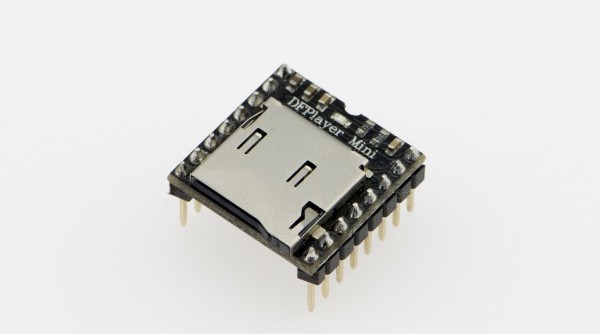
This is the MINIMAL setup
This tutorial shows how to use the module without a microcontroller and looping one single song with no volume control.
We have another tutorial showing how to use this module with Arduino.
File handling
The mp3 file needs to be placed in a folder named mp3, and the file needs to be named as 0001.mp3.
- You can download our example-sounds.zip
- Connect the module to a computer with a USBC cable.
- Create a folder called
mp3. - Place the mp3 files into that folder.
MAC User Attention!
If you are using Mac OS X to copy the mp3, the file system will automatically add hidden files like: "._0001.mp3" for index, which this module will handle as valid mp3 files.
It is really annoying. To remove them, follow the steps below:
- Finder - Go to your USB drive
- Press
Shift+Command+.to reveal all hidden files - Select all
.XXXXXXfiles and directories and delete - Empty Bin
- Eject your USB drive
Wiring
Wiring up the sensor is quite complex, the pins are not labelled, so you will have to refer to the pinout.
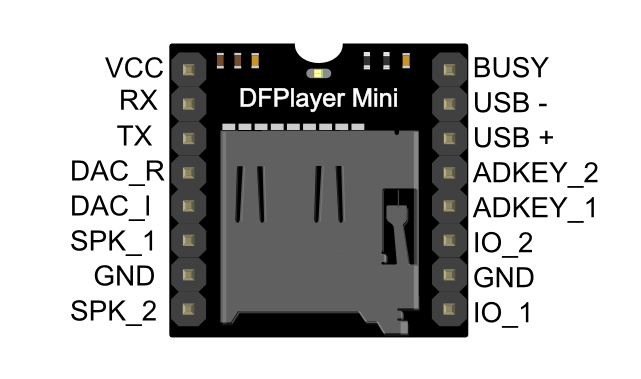
Power
In this tutorial, we are using 3 AAA batteries, which provide 4.5V. The module can take 3.3V-5V as power input. Be mindful when you use other types of power input.
DFplayer Mini Wiring
- VCC to Battery + (Power)
- GND to Battery - (Power)
- SPK_1 to 3.5mm audio jack middle pin
- SPK_2 to 3.5mm audio jack left/right pin
- ADKEY_1 to GND
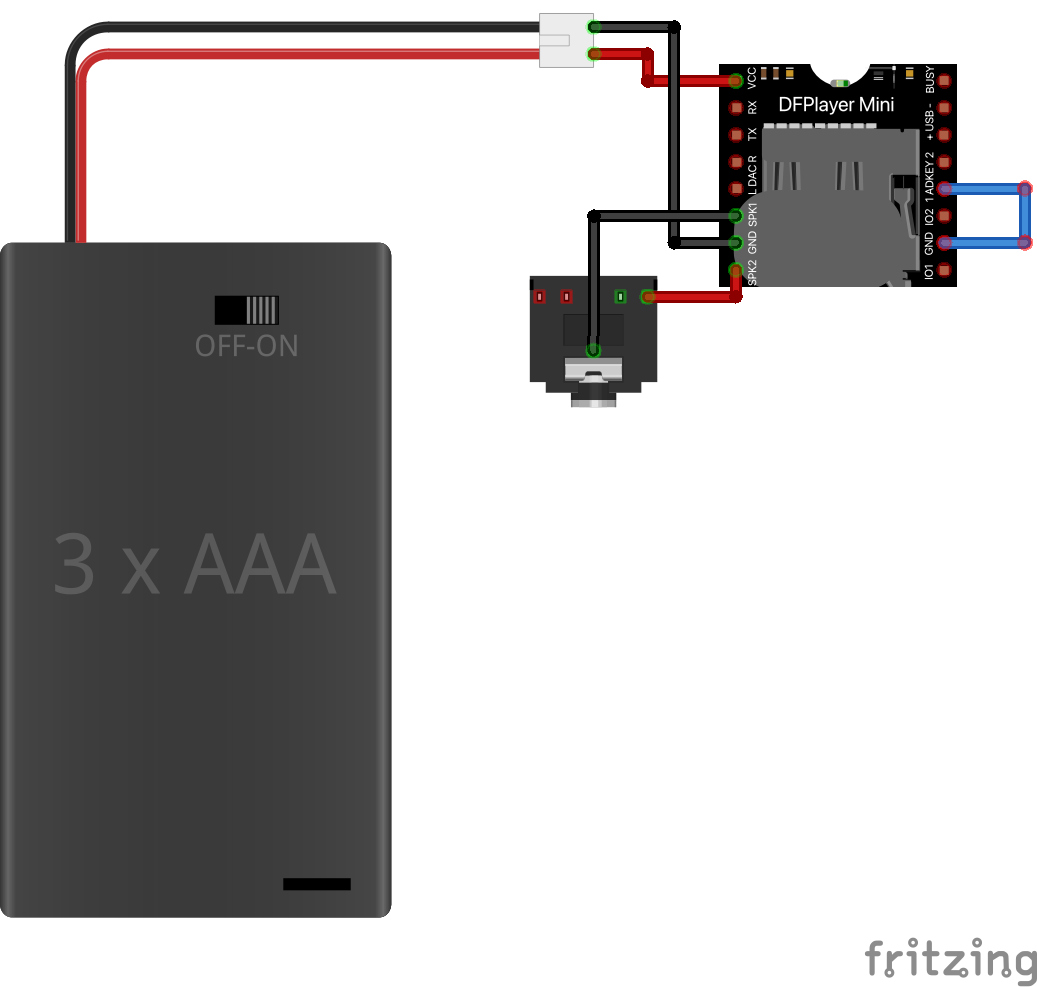
Now plug in your 3.5mm headphone or speaker, and the MP3 should be looping.
Other functions
With the AD keys, you can expand the functionality without using a microcontroller. Please reference the circuit diagrams and the table below.
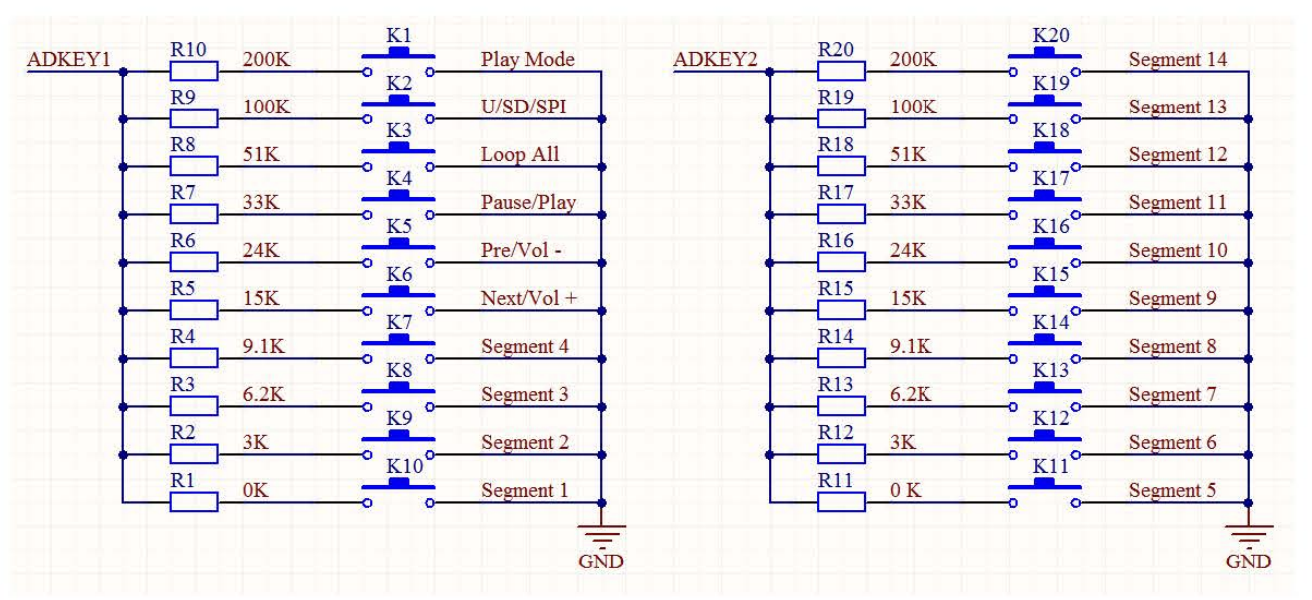
| Key | Short Push | Long Push | Description |
|---|---|---|---|
| K1 | Play Mode | Switch to interrupt / non interrupted | |
| K2 | Playback device switches | U/TF/SPI/Sleep | |
| K3 | Operating Mode | All cycle | |
| K4 | Play/Pause | ||
| K5 | Previous | Vol+ | |
| K6 | Next | Vol- | |
| K7 | 4 | Repeat play tracking 4 | Long push always to repeat play |
| K8 | 3 | Repeat play tracking 3 | Long push always to repeat play |
| K9 | 2 | Repeat play tracking 2 | Long push always to repeat play |
| K10 | 1 | Repeat play tracking 1 | Long push always to repeat play |
| K11 | 5 | Repeat play tracking 5 | Long push always to repeat play |
| K12 | 6 | Repeat play tracking 6 | Long push always to repeat play |
| K13 | 7 | Repeat play tracking 7 | Long push always to repeat play |
| K14 | 8 | Repeat play tracking 8 | Long push always to repeat play |
| K15 | 9 | Repeat play tracking 9 | Long push always to repeat play |
| K16 | 10 | Repeat play tracking 10 | Long push always to repeat play |
| K17 | 11 | Repeat play tracking 11 | Long push always to repeat play |
| K18 | 12 | Repeat play tracking 12 | Long push always to repeat play |
| K19 | 13 | Repeat play tracking 13 | Long push always to repeat play |
| K20 | 14 | Repeat play tracking 14 | Long push always to repeat play |